


Ask a maintenance planner what their week looks like, and you will often hear about three screens. The ERP holds the notifications and work orders. A spreadsheet or a whiteboard holds the plan for the week. And the phone holds everything that changes in between: a breakdown, a missing part, a team that is one person short. Keeping those three in sync is a job in itself, every single day.
A planning board that is part of the app
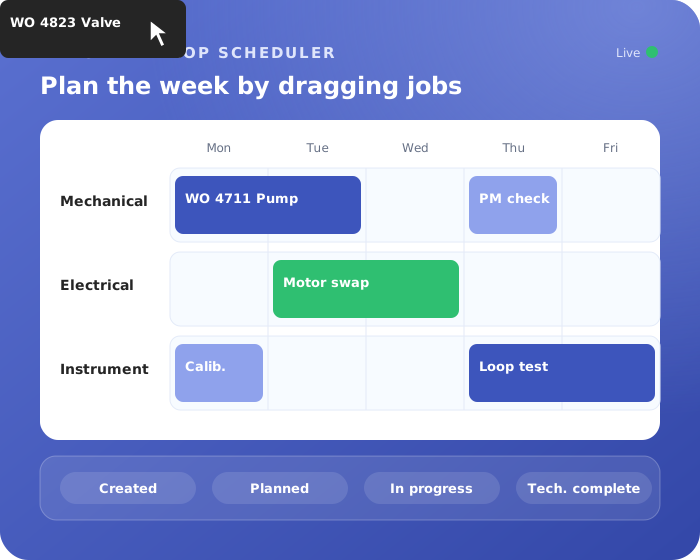
The Daily Maintenance app now comes with a fully integrated drag-and-drop scheduler. It is not a separate planning tool bolted on the side; it is part of the same app your team already uses for preparing, executing and closing out work.
Notifications from SAP or Maximo appear in the app automatically. From there, planning the week is a matter of dragging jobs onto a day and a team. Each job stays linked to everything that belongs to it: the original notification, the materials, the documents and photos, and the people who will do the work. Nothing has to be typed over.
See the week at a glance
Because the board is visual, problems stand out. You see straight away where a team still has room and where a day is overloaded. If a job has to move, you drag it to another day or team, and everyone who works with that job sees the change immediately. No new version of a spreadsheet, no round of phone calls.
One status logic for everyone
Planning is only half the story. Every job in the app follows the same lifecycle, from created to technically complete. Planners, supervisors and technicians all see the same status, and the board updates as the work moves forward. In the field, technicians update progress from their phone, for example by scanning a QR code, and add photos where needed.
The result is a plan that reflects reality. At any moment you can see what is planned, what is in progress and what is done, without asking around.
Each role sees what matters to them
A planner needs a different screen than a technician. The app is role-based: planners plan, supervisors approve and follow up, technicians execute. Everyone sees and acts on what applies to them, which keeps the screens clean and the app easy to use.
Dashboards that keep themselves up to date
Because planning, execution and close-out all happen in one place, the dashboards fill themselves. Progress, backlog and bottlenecks are visible without anyone building a report at the end of the week.
Runs in your own tenant
Like all our apps, Daily Maintenance runs on Microsoft Power Platform in your own Microsoft tenant, connected to SAP, Maximo and Microsoft Teams. There is no new software package to install; your users work with a Power Apps license.
See the scheduler in action
The scheduler is easiest to understand when you see it move. Book a 30-minute demo or read more about Daily Maintenance.